
Delay Start
The Delay Start setting allows you to program the recorder to not begin running its schedule until 12:00 AM at the start of the selected date, specified by year, month, and day.
For example, imagine you want the Song Meter Micro 2 to record only the winter season, but it would be much easier to reach the deployment site in the fall, before the first snowfall. This setting ensures the recorder will not waste valuable SD card space and battery life until the specified date.
If the Delay Start date is enabled, but you power on the Song Meter Micro 2 on or after the specified date, it will begin running its schedule immediately.
Configure Delay Start
About this task
The Delay Start setting can be configured directly on a paired recorder or when editing a configuration file in the Configuration Library.
Procedure
- Open the Configuration Editor.
-
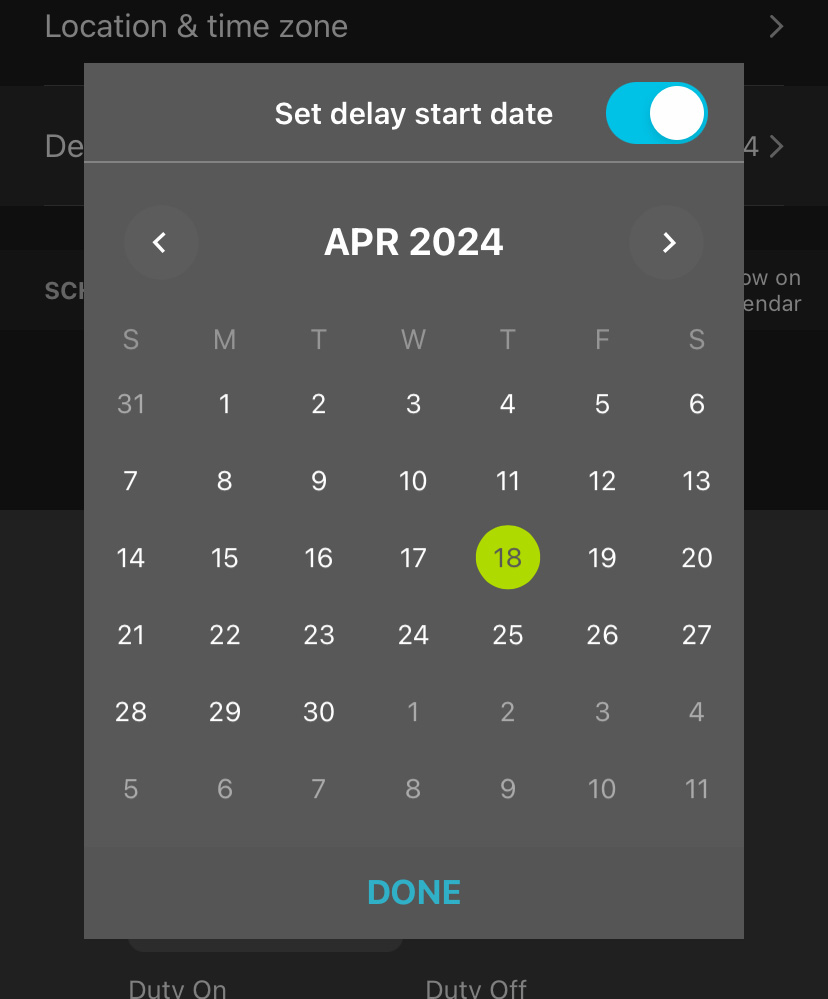
Tap on the Delay Start entry to open a calendar
interface.
-
Tap the Set delay start date toggle switch to enable or
disable the Delay Start setting.
When the toggle is enabled, the calendar is active.
- Navigate between months using the left and right arrows below the Set delay start date toggle.
- Select a date by tapping the corresponding entry on the calendar. The selected date is highlighted with a green circle.
- Tap DONE to save your Delay Start setting.