
Estimate Battery and Card Life Window
From the Configuration Editor screen, tap the Estimate battery and card life icon to open the Estimate battery and card life utility.
This utility estimates battery and SD card life for different battery types and card sizes, using the currently programmed schedule and settings.
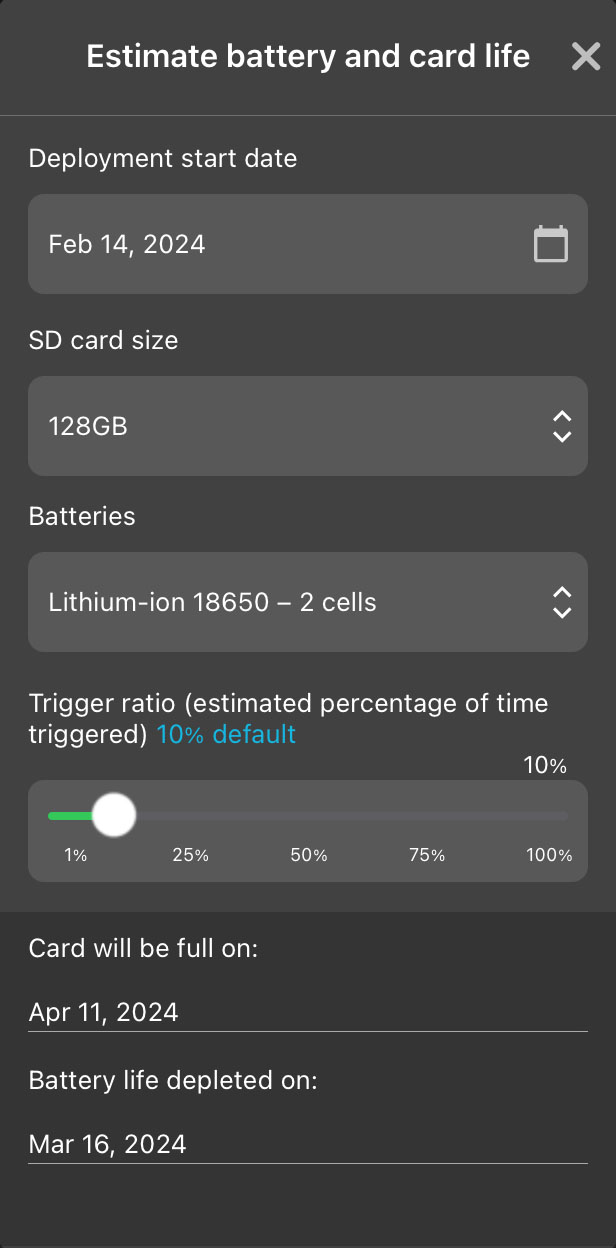
The Estimate battery and card life window contains the following elements:
- X (exit) button
-
Tap to close the Estimate battery and card life window.
- Deployment start date interactive calendar
-
Tap on the text showing the selected start date to open a calendar window and select a new start date.
Changing the expected start date directly affects the estimated end dates for SD card space and battery life. This date only affects the estimation; it does not affect when the recorder will start running its schedule. To specify an initial delay in the recorder's schedule, use the Delay Start setting.
- SD card size dropdown
-
Select the SD card capacity to use for estimating when the card will be completely full.
The options include the most common SD card sizes between 8 GB and 2 TB. If configuring a paired recorder, the Use Current Card option bases the estimation on the remaining available space on the installed SD card.
- Batteries dropdown
-
Select type and quantity of batteries to use for estimating when the batteries will die.
If configuring a paired recorder, Use Current Batteries measures the voltage of the installed batteries and estimates the remaining available energy.
- Number of Batteries Currently Installed dropdown
-
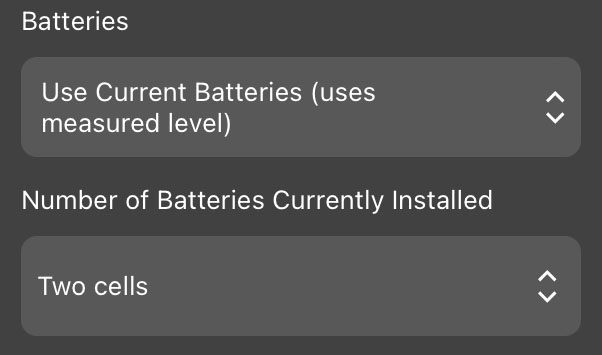
If Use Current Batteries is selected, use this dropdown to specify how many alkaline AA batteries or 18650 lithium-ion batteries are installed.
- Trigger ratio slider
-
Only used for schedules that include triggered ultrasonic recording.
This slider sets the percentage of time during triggered ultrasonic recording periods during which the Song Meter Mini Bat 2 is assumed to be actively recording audio.
See Factors Affecting Battery Life for a detailed description of this parameter.
- Card will be full on:
-
Displays the date on which the card is estimated to be full, based on the recorder configuration and SD card settings listed above.
The SD Card estimation assumes the recorder never runs out of power.
- Battery life depleted on:
-
Displays the date on which the batteries are estimated to lose power, based on the recorder configuration and battery settings listed above.1
The Battery Life estimation assumes the recorder never runs out of SD card space.
For a full table of the power consumption measurements that inform these battery life estimations, see Power Consumption and Expected Battery Life.