
Access the SMART Control Panel via the SMART Portal
Once you have connected a SMART System to the global Internet and have enabled the SMART IoT Gateway, you can access the SMART Control Panel from any Internet-connected device with a web browser.
Before you begin
- Connect your SMART System to the Internet and enable the SMART IoT Gateway with at least one authorized user.
- Create a user account on https://www.wildlifeacoustics.com using the same email address that is listed as a SMART IoT Gateway authorized user.
Procedure
- Go to https://www.wildlifeacoustics.com and go to .
-
If your current IP is not authorized, select .
Your public IP address will be authorized to access the SMART System via the SMART Portal.
-
Select the Control Panel URL to open the SMART Control
Panel.
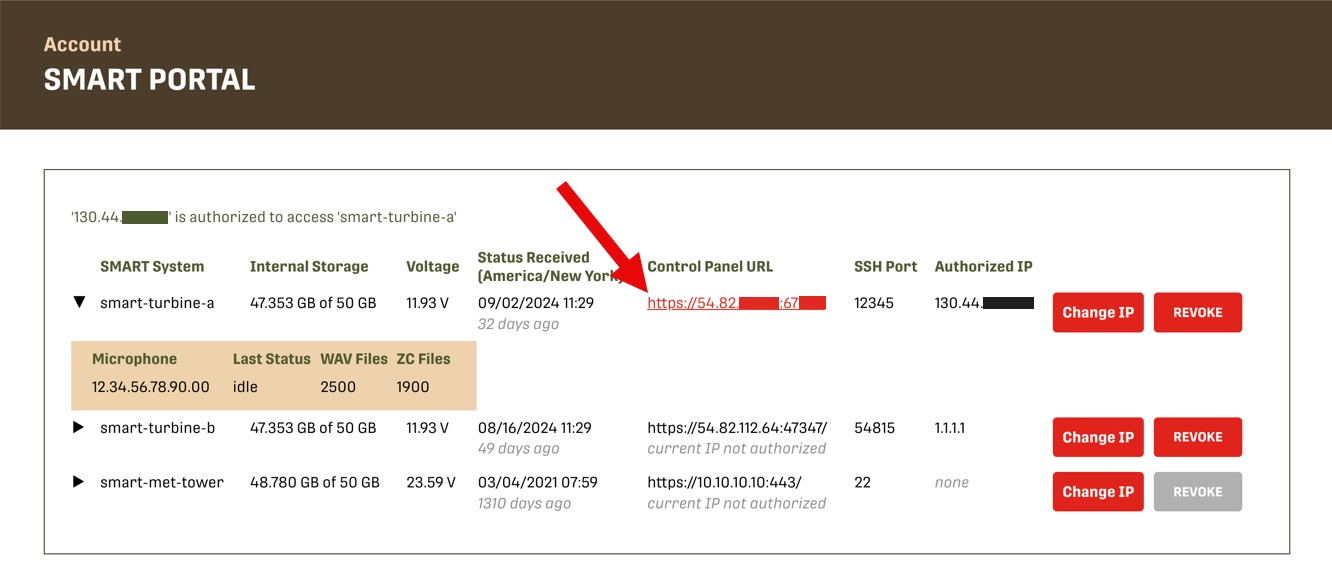
You can navigate directly to this URL from a device with an approved IP address. Logging into an account on https://www.wildlifeacoustics.com is not necessary unless your IP address has changed.Your browser may display a warning that your connection is not private. This is normal when connecting to a device like the SMART Controller with its default configuration. Select your browser's option to proceed anyway.
To avoid this warning in the future, ask your IT department to provide a signed SSL certificate and install it on the SMART Controller.
-
Sign in as the user
smartusing the SMART System password.